

Smartwatches are powerful tools, but they often struggle with a simple problem: they display data that someone else decided you should see, rather than the data you actually care about. If you are a Wear OS user, you have likely found yourself tapping through menus just to check your heart rate, count your steps, or see how many calories you have burned during a workout.
It is a small friction point that adds up throughout the day. You want your fitness metrics at a glance, right on your primary watch face, without having to launch a bulky app. That is exactly why we created Health Complication for Wear OS. By SimpleWF, this tool gives you control over your screen real estate, letting you build a dashboard that actually works for your daily routine.
Why Custom Complications Matter
Most watch faces come with fixed slots. Often, the stock options for health tracking are limited or don't sync with the specific metrics you prioritize. Maybe you are training for a 5K and need to see your active time and heart rate front and center, or perhaps you are just trying to hit a daily step goal and want that number to be the first thing you see when you flick your wrist.
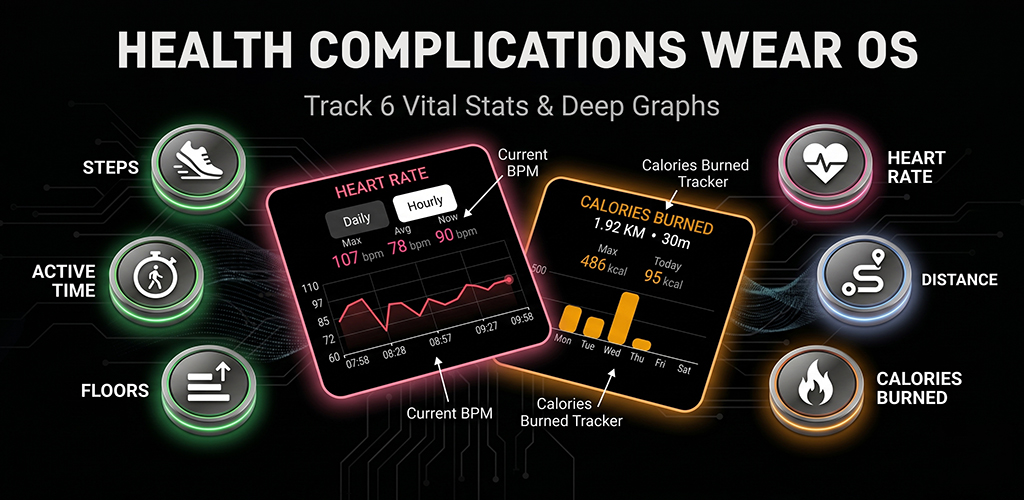
With Health Complication: Wear OS app, you get to choose. You can add:
- Step count
- Heart rate
- Calories burned
- Total distance
- Floors climbed
- Active time
By placing these directly on your favorite watch face, you eliminate the "app shuffle." You aren't just looking at a static number; you are keeping a pulse on your progress in real-time.
Turn Your Complications Into Shortcuts
One of the most useful, yet underutilized, features of Wear OS is the ability to map actions to your watch face. We decided to take this further. With Health Complication, you can set custom tap actions for every single metric you display.
Imagine this: you look at your heart rate complication on your watch face. You want to see your trend over the last hour. Instead of hunting for the health app in your app drawer, you just tap that heart rate icon. Because you have set a custom action, it immediately launches the app or activity you use most.
It turns your watch face into a navigation hub. You decide what happens when you interact with your data. It is about speed, efficiency, and reducing the time your screen is active.
Visualizing Data with Health Tiles
Sometimes a single number isn't enough. You want to see the "why" behind the data. That is why we built dedicated Health Tiles for Heart Rate and Calories.
These aren't just lists of numbers. They are designed to show graphs of your daily and weekly progress. If you are interested in how your heart rate spikes during your morning commute or how your calorie burn tracks throughout the week, these tiles provide that visual context. You can swipe through your tiles, see the trends, and get the information you need without ever having to open a separate, complex mobile app. It is health monitoring made simple, built for quick check-ins.
Privacy First: Your Health Data Stays Yours
We know that health data is personal. It is the kind of information that should belong to you and only you. In a market where many apps rely on cloud-based tracking, collecting your habits to feed servers, we went in a different direction.
SimpleWF apps are built to run locally on your watch. We do not track your movements, we do not store your data, and we certainly do not send it to any third-party servers. When you use Health Complication, your data stays on your wrist. Period. You get the benefits of real-time tracking without the privacy trade-offs.
Simple Setup for Everyone
We designed this app to be plug-and-play. You don’t need to be a tech expert to configure it. Just add the complications to your watch face and the tiles to your watch’s tile screen. There are no deep, complex menus or hidden settings that require a manual to understand.
Because this interacts directly with your watch's sensors, there are two standard permissions required: Body Sensor (including background access) and Activity Recognition. These permissions allow the app to securely access your heart rate and step data in real-time. Once those are granted, you are good to go.
Who is This For?
Whether you are an athlete tracking performance metrics, a casual user trying to stay active, or someone who just loves to customize their digital workspace, this app provides the utility you need. It works seamlessly with Wear OS smartwatches, so whether you are using a Google Pixel Watch, a Samsung Galaxy Watch, or any other Wear OS device, you can start tracking exactly how you want.
Stop settling for watch face layouts that don't fit your life. Take back your screen, prioritize the metrics that matter to you, and keep your health data private and accessible.
Ready to streamline your fitness tracking? Download Health Complication for Wear OS on the Play Store today and start seeing the data that matters most, exactly where you want it.