



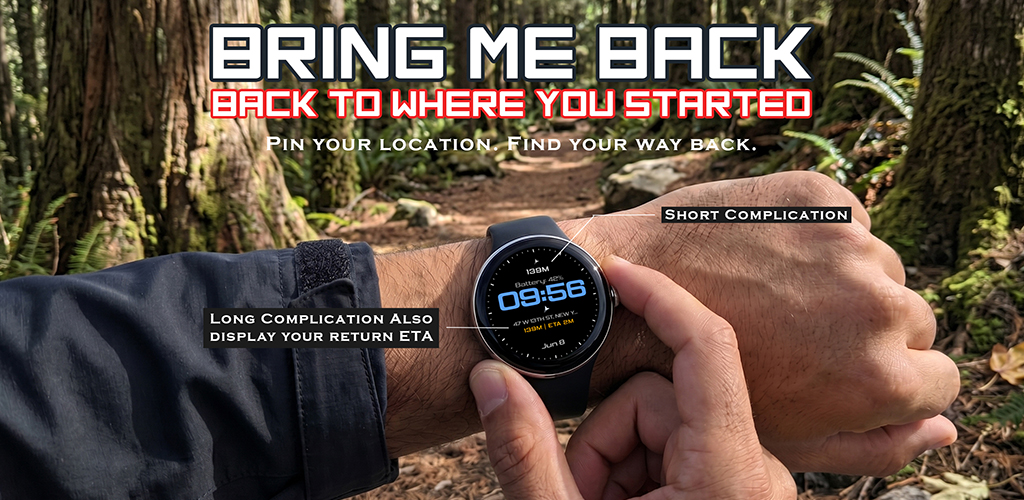
We have all been there. You finish a long hike, the sun starts to dip, and you realize you aren’t 100% sure which fork in the trail you took to get here. Or, you walk out of a shopping mall after a three-hour marathon session, only to look at an endless sea of identical cars, wondering if you parked in Zone A, B, or a completely different zip code.
It is a sinking feeling. You reach for your phone, but it’s dead. Or maybe you just don’t want to fiddle with a complex, data-hungry mapping app that drains your battery and tracks every move you make.
You don't need another cluttered GPS app. You need a tool designed for one specific, crucial task: getting you back to where you started. That is why we built Bring Me Back.
The Simple Reality of Getting LostWhether you are an outdoor enthusiast trekking through a mountain trail or an urban commuter navigating a multi-level parking garage, getting lost isn't just annoying and it is a massive drain on your time and energy. Most navigation apps are built for A-to-B routing; they want to find the fastest way to a new destination.
But what about when your destination is where you came from?
Bring Me Back was designed specifically for that moment. It doesn't care about traffic updates, restaurant reviews, or social media check-ins. It cares about one thing: your point of origin. It is the ultimate utility for the hiker, the traveler, and the person who simply wants to get back to their vehicle without a headache.
Why Bring Me Back is Your Essential Wear OS Companion
1. Zero-Fuss NavigationMost apps make you jump through hoops. With Bring Me Back, the workflow is fast and intuitive. You pin your location, and when you are ready, you navigate back. It is designed to be used in seconds so you can spend your time enjoying the adventure rather than staring at a screen.
2. Privacy-First TechnologyIn an era where every app wants access to your contacts, your search history, and your location data for advertising, Bring Me Back takes a different stance.
No Accounts: You don’t need to create a profile or log in.
Zero Tracking: We don't collect your data.
Local Storage: Your location history stays strictly on your device. What you save, stays with you. No cloud servers, no data harvesting, no worries.
3. Precision for Hikers and ExplorersIf you are hiking, you need accuracy. You don't want to guess which way to turn. Our app provides three distinct map zoom levels, allowing you to clearly view your starting point and the exact path you have traveled.
You can store up to 10 distinct locations and mark your top three as favorites. Whether it is your favorite trailhead, your hotel, or your secret fishing spot, they are just a tap away.
Customize Your ExperienceWe know that one size does not fit all. That is why Bring Me Back offers granular customization options that put you in control of your watch:
Metrics: Toggle effortlessly between kilometers and miles.
Walking Pace: Set your custom walking pace. Why? Because it leads to precise ETA tracking. You will know exactly how long it will take to get back to your starting point, which is crucial when you are racing against sunset or a parking meter.
Battery Optimization: Navigation can be a battery hog. Our app allows you to stop tracking when you don't need it and resume whenever you are ready.
Watch Face Integration: Our app works seamlessly with your watch face. With customizable Long Complications, your return ETA is always visible at a glance. Combined with subtle haptic feedback, you can stay on the move without constantly checking your wrist.
Who is Bring Me Back For?
The "I Forgot Where I Parked" Person
We all know the frustration of the suburban parking lot search. You pin your spot when you arrive. When you are done, you open the app, follow your path, and walk straight to your car. No guessing, no wandering, no stress.
The Weekend Hiker
You want to focus on the trail, not the GPS. Bring Me Back acts as your "breadcrumb" trail. Pin the trailhead, go explore the loop, and let the app handle the return direction. It is lightweight, efficient, and reliable when you are off the grid.
The Urban Traveler
Exploring a foreign city can be disorienting. If you are wandering through winding side streets, simply pin your hotel or the main station. It gives you the confidence to explore deeper, knowing you have a guaranteed way to find your way back.
Stop Checking Your Map, Start Enjoying the Adventure
The best technology is the kind that disappears when you don't need it and works instantly when you do. Bring Me Back doesn't try to be a Swiss Army knife. It is a scalpel—sharp, precise, and perfect for its purpose.
If you are a Wear OS user, this is the utility app that belongs in your toolkit. It is fast, privacy-focused, and incredibly easy to use.
Ready to stop getting lost? Download Bring Me Back on the Google Play Store today. Save your spot, explore with confidence, and always find your way home.
Frequently Asked Questions (FAQ)
Is Bring Me Back compatible with all Wear OS devices?Yes, Bring Me Back is designed specifically for the Wear OS ecosystem, ensuring a smooth, responsive experience on your watch.
Does it require a phone connection to work?Yes, the core navigation features of your app will work without internet, but with some limitations. Here is a breakdown:
What WILL work offline:
•GPS Tracking: The app uses the device's hardware GPS to get your coordinates, which does not require internet.
•Direction & Distance: Calculating the distance and bearing to your pinned location is done locally on the device using math, so it works perfectly offline.
•Compass/Radar Path: The radar "breadcrumb" path and the arrow pointing to your destination use the built-in rotation sensors (compass), which work offline.
•Saved Slots: Pining a new location and loading from your 10 saved slots uses local storage (SharedPreferences), so it's fully offline-capable.
What WON'T work offline:
•Map Background: The radar map uses OpenStreetMap tiles (tile.openstreetmap.org). These images are downloaded in real-time. Without internet, the background of the radar will be empty/black, though your path and the target pin will still show.
•Address Names (Geocoding): When you pin a new location, the app uses Geocoder to look up the street address. This requires an internet connection. If offline, it will likely show "Unknown Address" or a generic name, but the coordinates will still be saved correctly. Summary: You can safely use this app to find your way back to a car or a campsite in the middle of nowhere without any signal! You just won't see the street map background or the specific street address name.
How many locations can I save?You can save up to 10 unique locations, with the ability to designate your top 3 as favorites for even faster access.
Does the app drain my watch battery?We built this app with battery life in mind. By allowing you to stop tracking and resume only when necessary, you maintain control over your device's power usage.
Is my location data shared with third parties?Absolutely not. We prioritize your privacy. No accounts are required, no logins are necessary, and your data stays strictly on your device.